It had been a pain in the wrong place for a while at work where my desktop is behind a ISA proxy with authentication and I could not figure a way to get the proxy settings to work on a Ubuntu (Hardy Heron).
Then I googled and came across CNTLM which is a beauty; follow the instructions to install and configure it, set proxy to localhost:3128 and thats it.
I am doing a Synaptic update as I type this .. from now on I will be on top of the latest ubuntu and like software updates.
3 cheers to CNTLM.
Tuesday, December 08, 2009

Sunday, June 07, 2009
My VOIP just got better ..
I recently switched by ISP (TPG to Beagle Internet) mainly for ADSL 2+ service. Beagle did not provide VOIP and therefore and also for service decoupling reasons I subscribed to MyNetFone service. I am pretty happy with the service for the call costs primarily to India & USA.
I often do conference calls from home and been looking for ways to use the laptop's mic and speakers as the handsfree. Finally I found the solution. The solution is to ..
I often do conference calls from home and been looking for ways to use the laptop's mic and speakers as the handsfree. Finally I found the solution. The solution is to ..
- Use a Soft phone, configured for the VOIP provider, on my laptop. I found X-Ten X-Lite working just fine on my MacBook Pro and would imagine same on Dell XPS Studio / Vista / Win7 as well. See instructions here.
- I found this post with a working Apple Script to integrate Mac's Address Book to X Lite. This way I can right-click and dial a number from the Address Book. Cool ha .. Same script copied below here for convenience and as backup in the this post vanish in future.
using terms from application "Address Book"
 on action property
  return "phone"
 end action property

 on should enable action for thePerson with theEntry
  if theEntry is not missing value then
   return true
  else
   return false
  end if
 end should enable action

 on action title for thePerson with theEntry
  return "Mit X-Lite wahlen"
 end action title

 on perform action for thePerson with theEntry
  set thePhoneNumber to value of theEntry
  set theolddelimiter to AppleScript's text item delimiters

  set AppleScript's text item delimiters to "(0)"
  set thePhoneNumber to every text item of thePhoneNumber
  set AppleScript's text item delimiters to theolddelimiter
  set thePhoneNumber to thePhoneNumber as text

  set theNewPhoneNumber to ""

  repeat with a from 1 to length of thePhoneNumber
   set theCharacter to character a of thePhoneNumber
   if a is 1 and character a of thePhoneNumber is "+" then
    set theNewPhoneNumber to theNewPhoneNumber & "0011"
   end if
   if "0123456789" contains theCharacter then
    set theNewPhoneNumber to theNewPhoneNumber & theCharacter
   end if
  end repeat

  tell application "X-Lite"
   activate
   tell application "System Events"
    tell process "X-Lite"
     -- delete eventually existing number
     keystroke ""
     keystroke return
     -- dail
     keystroke theNewPhoneNumber
     keystroke return
    end tell
   end tell
  end tell
  return true
 end perform action
end using terms from - Moreover I could use Soundflower / Audacity like tools to record the call in case if required or when times I am meant to take notes. This I see as a big bonus. Yet to try this on Windows platform.
Sunday, June 15, 2008
The Indian Orthodox Church - A Brief History
- Sourced from M.G.O.C.S.M1 publications
The Indian Orthodox Church also known as the Malankara Orthodox Church, is an ancient Church of India and it traces its origin to as far back as A.D 52 when St.Thomas one of the disciples of Jesus Christ came to India and established Christianity in the South Western part of the sub-continent. The St. Thomas Christians or the Syrian Christians exist at present in different churches and denominations. But a major section of the parent body of St. Thomas Christians which has maintained its independent nature constitute the Indian Orthodox Church under the Catholicate of the East with headquarters at Devalokam, Kottayam, Kerala, India.
The beginning of the Church
That the Apostle Thomas, one of the Twelve, is the founder of the St. Thomas Christians has been well established. Christian writers and representatives of the Churches at least from the 4th century refer to the evangelistic labours of the Apostle Thomas in India and the Indian Christians ascribe the origin of their Church to this event in the first century.
It is reasonable to believe that the Apostle came to India, preached the Gospel, established the Church and died here as Martyr. Tradition has it that the Apostle Thomas established Seven Churches in Kerala and appointed Priests for them from 4 families.
The Persian Connection
The Indian Church came in contact with the East Syrian Church possibly from the 4th century. There is evidence that in the 8th century the Indian Church had its primate known as "The Metropolitan and the Gate of All India" a title adopted presumably under Islamic influences. The Vatican Codex 22, written in Cranganore in 1301 gives the title as "The Metropolitan of the Throne of St. Thomas and of the whole Church of the Christian India".
The Indian Church maintained its autonomous administration. The Church of Persia had a tradition which acknowledged autonomy of Churches in its communion abroad. The Church in Kerala continued as an administratively independent community till the 16th century.
The Portuguese Period
Things changed during the Portuguese period. The missionaries who came from abroad were eager to bring the Indian Church into communion with Rome. They worked on it almost throughout the 16th century. In 1599 by the Synod of Diamper, the assembly of representatives from churches was forced to give up the Indian Church's connection with the Patriarch of the Persian Church in favour of the Pope of Rome. But there was dissatisfaction among the people which led to a general revolt in 1653 known commonly as the Coonan2 Cross revolt. Portuguese efforts to put it down by force did not succeed. Now Rome entered the field directly through missionaries, and a section of those who rebelled went back to Roman allegiance.
A body of the people led by the Archdeacon, who stood for the administrative autonomy of the Indian Church inspite of serious difficulties, was determined to keep the independence of the Indian Church. The Portuguese were in fact instrumental in causing a division in the one united church in India. Although they succeeded in getting the allegiance of a party in the Church to the Roman Catholic community, an equally important party did not follow their way.
The Antiochene connection
The party that sought to preserve the Church's freedom appealed to several Eastern Christian Centers for help in restoring its episcopal succession. The Antiochene Syrian Patriarch responded and sent to India a Bishop, Metropolitan Mar Gregorios of Jerusalem who came to India in 1665. The Archdeacon who had been declared in the meantime to be Metropolitan Mar Thoma by the laying on of hands by 12 Presbyters was now confirmed by him in his episcopal rank and both of them worked together to organize the church on a firm footing. Mar Thoma I was followed in succession by a series of Prelates with the same name till 1816 when the last of them namely Mar Thoma IX came to the scene, but was soon replaced by Mar Dionysius II.
Malankara Orthodox Church had felt the need of assistance for establishing systematic education for its clergy, teaching the people the faith, instructing the clergy in properly celebrating the liturgical services and above all assistance in the maintenance of the episcopal succession intact. But the Orthodox Church maintained its autonomous administration and life under local leadership. Even the help from the Antiochene Syrian Patriarch was without any idea of formally submitting to his jurisdiction but only for an overall spiritual supervision and for keeping friendly relations.
There were differences of opinion over the authority of the Patriarch in the Malankara Church and it created certain difficulties. But the Church has always been successful in maintaining its freedom and never allowed any foreign domination.
Co-operation with the Church Mission Society (C.M.S)
By 1795 the British established themselves in South India and Kerala came under their sway. During the time of Col. Munroe who was the British Resident in Kerala, Pulikottil Ittoop Ramban expressed his interest in founding a Seminary for the teaching of the Church's Clergy. The Resident supported him and the seminary was founded in 1815. Pulikottil Ittoop Ramban became a Bishop - Metropolitan Mar Dionysius II.
From 1816 the experiment of cooperation between the Malankara Church and the C.M.S of the Anglican Church was carried on, but it was found to be unsuccessful and was called off in 1836.
This incident led to the division of the community into three bodies. One of them, a reformed group tried to make serious reforms in the liturgy and practices of the Church as a whole but failed. After about half a century of conflict within the church this body had to withdraw and organize itself as the Mar Thoma Syrian Church. A small body of the Syrian Christians opted to join with the missionaries and be absorbed in the Anglican Church. The majority of the community continued in the Church without accepting the reforms.
Catholicate established in Malankara in 1912
In this conflict the Metropolitan obtained the support of Patriarch Mar Abdul Messiah the immediate successor to Patriarch Peter III. Patriarch Peter III was succeeded in 1895 by Mar Abdul Messiah. Because of state interference, he lost his position in Turkey and came to be replaced by Mar Abdullah. While Metropolitan Mar Dionysius VI clashed with Mar Abdullah, the Canonical senior Patriarch Mar Abdul Messiah offered to come to the assistance of the former. Thus in 1912 he came to Kerala and associated with Mar Dionysius VI and the Bishops and the Church with him, to establish the Catholicate of the East in Malankara. The ceremony was held at St. Mary's Church, Niranam on 15th September 1912; Niranam Church is one of the seven Churches founded by St. Thomas during his visit here in the first century.
The Catholicate of the East was thus established in Malankara with the co-operation of the Canonical Patriarch Mar Abdul Messiah who was senior to Mar Abdullah. Thereby the Patriarch himself has withdrawn his right of spiritual oversight if any in the Indian Church, which the Royal Court of Appeal had acknowledged for him in 1889.
The designation "Catholicos of the East" to the successors of St. Thomas the Apostle was given by the Jerusalem Synod of AD 231. The head quarters of the Orthodox Church of the East was first at Uraha (Edessa) in Persia. This was moved to 'Selucia' and it was there the tittle "Catholicos of the East" originated. Catholicos is an ecclesiastical dignitary recognized in the Antiochene Syrian Church also. He is equal in rank with the Patriarch though the latter is considered as first among equals (primus interparees).
Constitution of the Church adopted in 1934
Malankara Orthodox Church is now administered as per the constitution adopted in 1934 which was passed by the Malankara Syrian Christian Association. The Association is a fully representative body of the Church with elected members-priests and laymen-from all the Parish Churches. One Priest each and laymen 1 to 10 depending on the number of members in each parish are members of the Association. There are about 1400 parishes under Malankara Orthodox Church. It is the Association which elects the Catholicos and Malankara Metropolitan and also the Bishops.
There is a Managing Committee for the Association with members from each Diocese elected by the Association. The Malankara Metropolitan is the President of the Managing Committee and the remaining Prelates having administrative charge are the Vice-Presidents.
The Association Managing Committee has a Working Committee with the Malankara Metropolitan as its President. The Working Committee is also the Consultative Committee of the Malankara Metropolitan.
The Episcopal Synod has all the Prelates of the Malankara Church as members. Matters concerning Faith, Order and Discipline are under the authority of the Episcopal Synod. It is the Episcopal Synod which installs the Catholicos.
Current State
The Indian Church has an Apostolic foundation. Now with the establishment of the Catholicate in 1912 the Orthodox Church has come to its own. The canonised saints of our church are St.Gregorios of Parumala, St.Dionysius and St.Baselios. Although majority of the members of the church numbering about 2.5 million live in Kerala, they could be found now spread over not only in all the different states of India, but also in all the continents through out the world. There are a total of 25 Dioceses now, 19 of them in Kerala and 6 of outside Kerala i.e., Madras, Bombay, Calcutta, Delhi, America and the Diocese of Canada-UK-Europe. Parishes outside India, other than those in the two Dioceses of America and Canada-UK-Europe are included in the four dioceses of Madras, Bombay, Calcutta and Delhi. The St.Mary's Indian Orthodox Church, Melbourne belongs to the Diocese of Madras. The Indian Orthodox Church is hence an ancient, autonomous, independent Indian Church whose Supreme Head is His Holiness The Catholicos of the East and Malankara Metropolitan.
Thursday, February 28, 2008
VirtualBox on Mac saved me !!
Recently I quit Oracle and therefore I re-imaged my MacBook Pro to get rid of VMWare and few other such baggages I was carrying along with I lost my virtual machines with Oracle 10g database installed.
Renny was stuck with some Oracle Stored Procedure issue and she wanted to get Oracle 10g running on my laptop. And I had 0 time to get it going. There have not been any Mac releases of Oracle Database lately. So I am momentarily stuffed.
My options were to get VMWare Fusion, Q.app (qemu for Mac) or VirtualBox. Last time I tried VirtualBox I was getting error when I startup the guest OS. But thought will it a try ...
There comes VirtualBox to wrap Ubuntu Gutsy Gibbon, Oracle XE 10g. All took about 30 minutes to get started, incl. downloads. I preferred to run only the database from within the guest OS and run Eclipse, SQL Developer etc from Host OS which is Mac OS X in this case. Now the stumble was with the networking in VirtualBox which by default is NAT/NAPT. So no IP Address assigned to host OS so that I can make a TCP connection from host to guest (whereas vice-versa works fine).
Bit of a Googling and the VirtualBox User Manual introduces me to VBoxManage using which you can add port forwarding to guest OS settings whereby a port connection on host is forwarded to mapped port on guest. So using following commands I was able to set this up for TNS listener and worked like a charm when tested with SQL Developer running on host.
VBoxManage setextradata "Ubuntu 7.10" "VBoxInternal/Devices/pcnet/0/LUN#0/Config/tns/Protocol" TCP
VBoxManage setextradata "Ubuntu 7.10" "VBoxInternal/Devices/pcnet/0/LUN#0/Config/tns/GuestPort" 1521
VBoxManage setextradata "Ubuntu 7.10" "VBoxInternal/Devices/pcnet/0/LUN#0/Config/tns/HostPort" 1521
Renny was stuck with some Oracle Stored Procedure issue and she wanted to get Oracle 10g running on my laptop. And I had 0 time to get it going. There have not been any Mac releases of Oracle Database lately. So I am momentarily stuffed.
My options were to get VMWare Fusion, Q.app (qemu for Mac) or VirtualBox. Last time I tried VirtualBox I was getting error when I startup the guest OS. But thought will it a try ...
There comes VirtualBox to wrap Ubuntu Gutsy Gibbon, Oracle XE 10g. All took about 30 minutes to get started, incl. downloads. I preferred to run only the database from within the guest OS and run Eclipse, SQL Developer etc from Host OS which is Mac OS X in this case. Now the stumble was with the networking in VirtualBox which by default is NAT/NAPT. So no IP Address assigned to host OS so that I can make a TCP connection from host to guest (whereas vice-versa works fine).
Bit of a Googling and the VirtualBox User Manual introduces me to VBoxManage using which you can add port forwarding to guest OS settings whereby a port connection on host is forwarded to mapped port on guest. So using following commands I was able to set this up for TNS listener and worked like a charm when tested with SQL Developer running on host.
VBoxManage setextradata "Ubuntu 7.10" "VBoxInternal/Devices/pcnet/0/LUN#0/Config/tns/Protocol" TCP
VBoxManage setextradata "Ubuntu 7.10" "VBoxInternal/Devices/pcnet/0/LUN#0/Config/tns/GuestPort" 1521
VBoxManage setextradata "Ubuntu 7.10" "VBoxInternal/Devices/pcnet/0/LUN#0/Config/tns/HostPort" 1521
All is good that ends good .. And they lived happily ever after !!
Thursday, February 21, 2008
I like to see Groovy to be something like Forte 4GL
Forte 4GL (known later as Unified Development Server [UDS]) as the name says a Fourth Generation Language. The language used is Transaction Object Oriented Language (TOOL). Sun Microsystems bought this from Forte Inc. and I would say sun set on this now.
Take a look at the TOOL Reference Manual to see how simple and easy the semantics are. The complete documentation set is available at http://docs.sun.com/app/docs/coll/S1_UnifiedDevelopmentServer_35.
Coming to the point, I like to see Java mature to a stage where it can complement Groovy to be a 4GL and have tools to develop applications like how it is done using Forte Workshop.
Forte Workshop (IDE) got to its own proprietary Version Control, Configuration Management and Middleware container. The above said tool could be based on Eclipse (IDE), Subversion (Version Control), OSGI (Configuration Management) and Apache Felix + EJB (Middleware container).
Only if someone could kick start something like this ..
Take a look at the TOOL Reference Manual to see how simple and easy the semantics are. The complete documentation set is available at http://docs.sun.com/app/docs/coll/S1_UnifiedDevelopmentServer_35.
Coming to the point, I like to see Java mature to a stage where it can complement Groovy to be a 4GL and have tools to develop applications like how it is done using Forte Workshop.
Forte Workshop (IDE) got to its own proprietary Version Control, Configuration Management and Middleware container. The above said tool could be based on Eclipse (IDE), Subversion (Version Control), OSGI (Configuration Management) and Apache Felix + EJB (Middleware container).
Only if someone could kick start something like this ..
Tuesday, February 05, 2008
Keywords I like to cover during IT session to our church folks
basic internet, virus, firewall
ADSL flavors, IP Phony, Skype
podcasts, simulcasts, webcasts,Feeds, RSS, ATOM google services
portal, Web 2, Ajax, RIA, Blogging, wiki
DVI, HDMI, Media Station, HD DVD, HD TV, Blue Ray
USB, Firewire, PCMCIA
ADSL flavors, IP Phony, Skype
podcasts, simulcasts, webcasts,Feeds, RSS, ATOM google services
portal, Web 2, Ajax, RIA, Blogging, wiki
DVI, HDMI, Media Station, HD DVD, HD TV, Blue Ray
USB, Firewire, PCMCIA
Thursday, January 10, 2008
Hiccups with PHP5 and xdebug on RHEL
Root cause of all this was that /usr/ filesystem is Read-only; so I had to compile binaries to install on writable area. So i did the following.
1. Executed the following from php source root folder; this installed the php binaries under --prefix location
./configure --prefix /scratch/asamuel/projects/opensource/php-5.2.5/install
make
make install
2. Executed the following from xdebug source root folder
/scratch/asamuel/projects/opensource/php-5.2.5/install/bin/phpize
./configure --enable-xdebug --with-php-config=../../php-5.2.5/install/bin/php-config
make
3. Copied /scratch/asamuel/projects/opensource/php-5.2.5/php.ini-recommended to /scratch/asamuel/projects/opensource/php-5.2.5/php.ini
4. Modified php.ini to load xdebug extension and enable remote debugging using
zend_extension="/scratch/asamuel/projects/opensource/xdebug/xdebug-2.0.2/modules/xdebug.so"
xdebug.remote_enable=On
3. Verified the build using (where alias php5=/scratch/asamuel/projects/opensource/php-5.2.5/sapi/cli/php -c /scratch/asamuel/projects/opensource/php-5.2.5/php.ini $*)
php5 -v
which resulted
PHP 5.2.5 (cli) (built: Jan 10 2008 12:52:19)
Copyright (c) 1997-2007 The PHP Group
Zend Engine v2.2.0, Copyright (c) 1998-2007 Zend Technologies
with Xdebug v2.0.2, Copyright (c) 2002-2007, by Derick Rethans
1. Executed the following from php source root folder; this installed the php binaries under --prefix location
./configure --prefix /scratch/asamuel/projects/opensource/php-5.2.5/install
make
make install
2. Executed the following from xdebug source root folder
/scratch/asamuel/projects/opensource/php-5.2.5/install/bin/phpize
./configure --enable-xdebug --with-php-config=../../php-5.2.5/install/bin/php-config
make
3. Copied /scratch/asamuel/projects/opensource/php-5.2.5/php.ini-recommended to /scratch/asamuel/projects/opensource/php-5.2.5/php.ini
4. Modified php.ini to load xdebug extension and enable remote debugging using
zend_extension="/scratch/asamuel/projects/opensource/xdebug/xdebug-2.0.2/modules/xdebug.so"
xdebug.remote_enable=On
3. Verified the build using (where alias php5=/scratch/asamuel/projects/opensource/php-5.2.5/sapi/cli/php -c /scratch/asamuel/projects/opensource/php-5.2.5/php.ini $*)
php5 -v
which resulted
PHP 5.2.5 (cli) (built: Jan 10 2008 12:52:19)
Copyright (c) 1997-2007 The PHP Group
Zend Engine v2.2.0, Copyright (c) 1998-2007 Zend Technologies
with Xdebug v2.0.2, Copyright (c) 2002-2007, by Derick Rethans
Tuesday, January 08, 2008
Hiccups with Oracle Database
The Oracle Database installation and interfaces (sqlplus like) have improved heaps from what I can remember from the days of 8i version. With Oracle XE, installation is so simple that even a pre-teen can do it. But still you cud hit stumbles like following one(s) and takes bit of googling for find you way out.
1. Unable to access Apex (formerly HTMLDB) application remotely.
The apex service by default (as on 10g) will be running at port 8080 and is accessible locally using http://localhost:8080/apex; but due to security-by-default policy it is not accessible remotely using http://myhost.mydomain:8080/apex. To enable it login, using sqlplus or sqldeveloper as sysdba and execute the following.
exec dbms_xdb.setListenerLocalAccess(false);
More hiccups to follow as and when encountered.
1. Unable to access Apex (formerly HTMLDB) application remotely.
The apex service by default (as on 10g) will be running at port 8080 and is accessible locally using http://localhost:8080/apex; but due to security-by-default policy it is not accessible remotely using http://myhost.mydomain:8080/apex. To enable it login, using sqlplus or sqldeveloper as sysdba and execute the following.
exec dbms_xdb.setListenerLocalAccess(false);
More hiccups to follow as and when encountered.
Monday, December 17, 2007
Could Not Open Default Font 'Fixed' - Linux
This is a #@%$^ of a problem; I fix it every time and forgets the fix; so its time to blog it.
Fix is as simple as creating a symlink to /usr/share/fonts/X11/ as /usr/share/X11/fonts, ie, from command prompt do
ln -s /usr/share/fonts/X11/ /usr/share/X11/fonts
Fix is as simple as creating a symlink to /usr/share/fonts/X11/ as /usr/share/X11/fonts, ie, from command prompt do
ln -s /usr/share/fonts/X11/ /usr/share/X11/fonts
Sunday, December 16, 2007
A cool example of MVC Pattern
MVC (Model-View-Controller) can be bit confusing for some. I like to demonstrate same using a simple example here.
Open my resume [not my latest, if you interested in my latest resume here it is :-)] in any xml-friendly browser such as Firefox and see how the XML is rendered.
Explanation:-
1. The xml file is the Model in this case; which contains structured data.
2. The resume.xsl is the Controller which translates this xml to HTML, the View, which gets rendered in the browser user interface.
Note that the Model is not coupled with View and Controller is the binder of the Model to the View.
Open my resume [not my latest, if you interested in my latest resume here it is :-)] in any xml-friendly browser such as Firefox and see how the XML is rendered.
Explanation:-
1. The xml file is the Model in this case; which contains structured data.
2. The resume.xsl is the Controller which translates this xml to HTML, the View, which gets rendered in the browser user interface.
Note that the Model is not coupled with View and Controller is the binder of the Model to the View.
Monday, November 19, 2007
Playing MMS content using mplayer in Linux behind proxy
It took me a month of fiddling to figure this out. Finally succeeded with
thanks to: How to play ASX using Mplayer
Ubuntu Gutsy
MPlayer
Here is what I did
1. created /etc/mplayer_proxy.sh and chmod +x
/usr/bin/mplayer http_proxy://proxyHost:proxyPort/$*
2. created /etc/mplayer.radios with following content
alias 774='/etc/mplayer_proxy.sh mms://media3.abc.net.au/774melbourne'
alias mmm='/etc/mplayer_proxy.sh mms://66.70.119.243/ads/slate_intro04_200.wmv'
alias surya='/etc/mplayer_proxy.sh mms://87.106.139.40/surya_tv_streaming_only_on_keralabeats'
alias hitfm='/etc/mplayer_proxy.sh mms://wm-live.abacast.com/arabian_radio-hitfm-24'
alias classicfm='/etc/mplayer_proxy.sh mms://media3.abc.net.au/classicfm'
alias foxfm='/etc/mplayer_proxy.sh mms://66.70.119.243:81/FoxFM'
alias news='/etc/mplayer_proxy.sh mms://media3.abc.net.au/news-radio'
alias jjj='/etc/mplayer_proxy.sh mms://media3.abc.net.au/triplej'
alias vegafm='/etc/mplayer_proxy.sh mms://202.58.32.105/Vega915'
alias livemal='/etc/mplayer_proxy.sh http://bluedog.wavestreamer.com:5108/'
3. source /etc/mplayer.radios from /etc/bash.bashrc
thanks to: How to play ASX using Mplayer
Ubuntu Gutsy
MPlayer
Here is what I did
1. created /etc/mplayer_proxy.sh and chmod +x
/usr/bin/mplayer http_proxy://proxyHost:proxyPort/$*
2. created /etc/mplayer.radios with following content
alias 774='/etc/mplayer_proxy.sh mms://media3.abc.net.au/774melbourne'
alias mmm='/etc/mplayer_proxy.sh mms://66.70.119.243/ads/slate_intro04_200.wmv'
alias surya='/etc/mplayer_proxy.sh mms://87.106.139.40/surya_tv_streaming_only_on_keralabeats'
alias hitfm='/etc/mplayer_proxy.sh mms://wm-live.abacast.com/arabian_radio-hitfm-24'
alias classicfm='/etc/mplayer_proxy.sh mms://media3.abc.net.au/classicfm'
alias foxfm='/etc/mplayer_proxy.sh mms://66.70.119.243:81/FoxFM'
alias news='/etc/mplayer_proxy.sh mms://media3.abc.net.au/news-radio'
alias jjj='/etc/mplayer_proxy.sh mms://media3.abc.net.au/triplej'
alias vegafm='/etc/mplayer_proxy.sh mms://202.58.32.105/Vega915'
alias livemal='/etc/mplayer_proxy.sh http://bluedog.wavestreamer.com:5108/'
3. source /etc/mplayer.radios from /etc/bash.bashrc
Wednesday, May 30, 2007
Kochi going hi-tech
This is an email forward I got from Sunil, my bro; Is Kochi turning to be a Satellite city ? I see good and bad with all these ..
Kochi 2009
Kochi currently has no malls; however, by 2009, the city is expected to have 6 malls covering a built-up area of 1.60 million sq ft, according to Cushman & Wakefield. Malls like Forum (expected to have 1 million+ sq ft of space), Lulu Mall, Aerens Gold Souk, Abad Mall, Metro One, Mall O, The Summit (to be spread over 12 floors) and Kalyan Mall are being planned. There have been reports that DLF too is looking at a mall-cum-hotel project in the city, near Marine Drive.
RAK Princeton, Edappally - 20 floors

RAK Princeton, Edappally - 20 floors
The Summit Mall, MG Road
Peevees Group, is in the process of setting up an international style shopping and entertainment mall in Kochi at an investment of Rs 175 crore.the project will host the first cine multiplex in Kerala
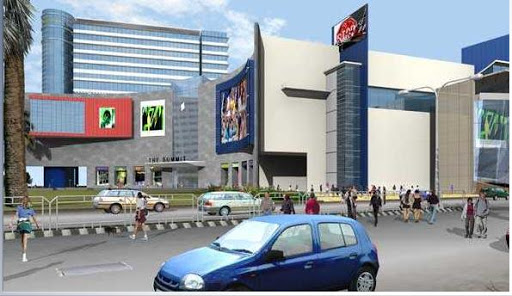
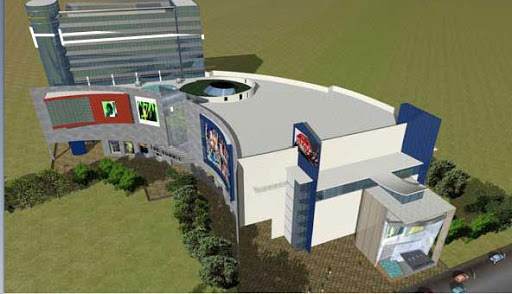
Mall O, Edappally - 350,000 sqft
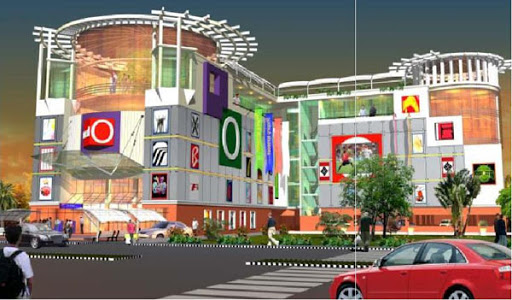
Metro One Mall, Kaloor - 16 floors
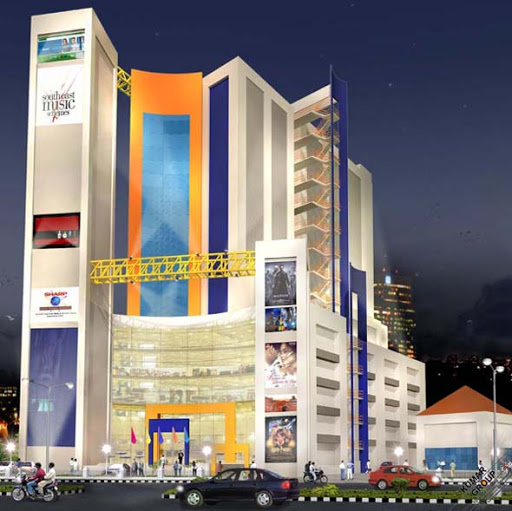
Aerens GoldSouk mall, Vyttila - 450,000 sqft
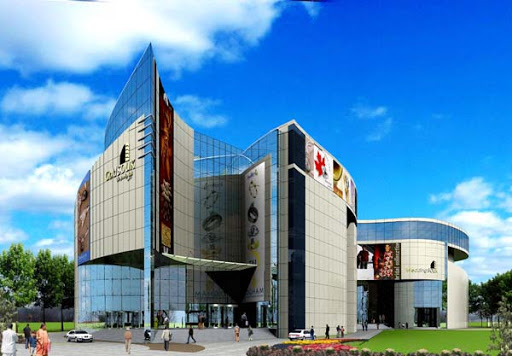
Swapnil Regency, Kakkanad - 30 floors

Prestige Neptune's Courtyard, Marine Drive - 18 floors


Dreams Hotel - 19 storeyed
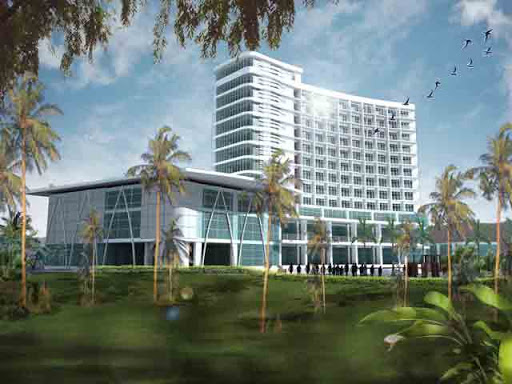
Choice Prestige, Tripunithra (40 floors)

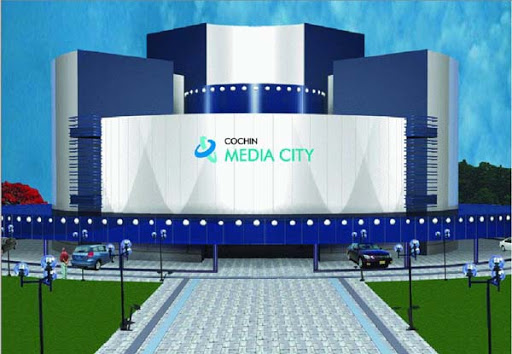
Cochin Media City
L&T Tejomaya Tech Park, Infopark Campus
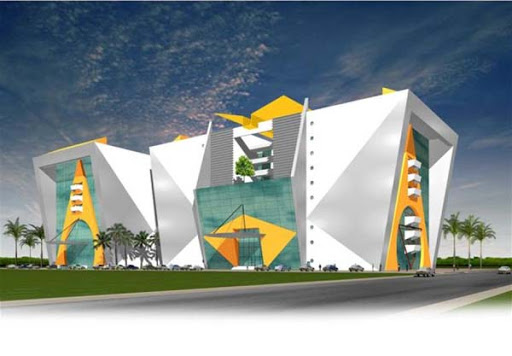
Park View, Convent Road - 16 floors
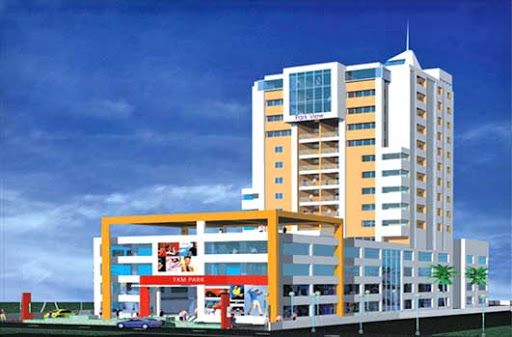
A hotel-cum-mall Admiral Plaza, Palarivattom - BCG builders

Kochi 2009
Kochi currently has no malls; however, by 2009, the city is expected to have 6 malls covering a built-up area of 1.60 million sq ft, according to Cushman & Wakefield. Malls like Forum (expected to have 1 million+ sq ft of space), Lulu Mall, Aerens Gold Souk, Abad Mall, Metro One, Mall O, The Summit (to be spread over 12 floors) and Kalyan Mall are being planned. There have been reports that DLF too is looking at a mall-cum-hotel project in the city, near Marine Drive.
RAK Princeton, Edappally - 20 floors
RAK Princeton, Edappally - 20 floors
The Summit Mall, MG Road
Peevees Group, is in the process of setting up an international style shopping and entertainment mall in Kochi at an investment of Rs 175 crore.the project will host the first cine multiplex in Kerala
Mall O, Edappally - 350,000 sqft
Metro One Mall, Kaloor - 16 floors
Aerens GoldSouk mall, Vyttila - 450,000 sqft
Swapnil Regency, Kakkanad - 30 floors
Prestige Neptune's Courtyard, Marine Drive - 18 floors
Dreams Hotel - 19 storeyed
Choice Prestige, Tripunithra (40 floors)
Cochin Media City
L&T Tejomaya Tech Park, Infopark Campus
Park View, Convent Road - 16 floors
A hotel-cum-mall Admiral Plaza, Palarivattom - BCG builders
Sunday, May 06, 2007
Connecting a Wireless device to a LAN
1. Bootup the windows computer (wireless device) to be connected.
2. From Start Menu, select Run, type in cmd and hit OK. This opens a black command box.
3. Type in ipconfig /all and hit enter. This will list all your logical and physical network interfaces and details.
4. Identify the interface corresponding to the wireless device using its Description. Note down the Physical Address which will look something like 00-50-EB-C0-00-A1.
5. Open up the admin console of the wireless router / access point using browser; authenticate as the admin user.
6. Navigate to the MAC Address Filter; add the Physical Address from steps above to the list. Save the list; apply the changes. Warm boot using the restart option in the admin console.
7. Using the wireless admin tool on the wireless device to connect to the network using your wireless network's SSID (KALATHUR.NET in one case I know !!) and also provide the encryption key, if there is one.
(8. Drop a comment in this blog, if this was a success or not !!)
2. From Start Menu, select Run, type in cmd and hit OK. This opens a black command box.
3. Type in ipconfig /all and hit enter. This will list all your logical and physical network interfaces and details.
4. Identify the interface corresponding to the wireless device using its Description. Note down the Physical Address which will look something like 00-50-EB-C0-00-A1.
5. Open up the admin console of the wireless router / access point using browser; authenticate as the admin user.
6. Navigate to the MAC Address Filter; add the Physical Address from steps above to the list. Save the list; apply the changes. Warm boot using the restart option in the admin console.
7. Using the wireless admin tool on the wireless device to connect to the network using your wireless network's SSID (KALATHUR.NET in one case I know !!) and also provide the encryption key, if there is one.
(8. Drop a comment in this blog, if this was a success or not !!)
Sunday, January 14, 2007
30 Essential Free (& Open) Software for Windows
1. Firefox
http://www.getfirefox.com/
Replaces Internet Explorer
If U haven't switched to Firefox 4 your web browsing needs, do it now. It
stops annoying popups & it has tons of amazing plugins that can make
surfing the web even better. I could evangelize all day about Firefox, but
one thing's 4 sure: the first thing I do on any new Windows machine is run
Internet Explorer just long enough to download Firefox.
2. Thunderbird
http://www.mozilla.org/thunderbird/
Replaces Microsoft Outlook or Eudora
Thunderbird is an email client that has five big things going 4 it: it's
free, it's full featured, it's lightweight & runs quick, it has an
unparalleled spam filter, & it protects U from those ridiculous phishing
attacks by clearly indicating which emails send U to a bogus website. If
you're not already using a web-based email solution, Thunderbird should be
your client.
3. Sunbird
http://www.mozilla.org/projects/calendar/sunbird/
Replaces Microsoft Outlook's calendaring functions
Might as well get the Mozilla trifecta out of the way by mentioning
Sunbird, which is the Mozilla Foundation's calendaring program. It's
extremely easy to use (I figured out everything I needed in a minute or
two) & easy to share your calendar with others. I consider a calendaring
tool to be essential if you're using a laptop, & this is no different.
4. Abiword
http://www.abisource.com/
Replaces Microsoft Word
Want a good word processor but find Microsoft Word too expensive? AbiWord
is my favorite replacement 4 Word. It's lightweight (meaning it runs
quickly) & includes pretty much every feature that I use regularly in a
word processor, plus it can save files in formats that U can exchange with
Word & WordPerfect users, plus open any of their files, too.
5. OpenOffice
http://www.openoffice.org/
Replaces Microsoft Excel & Microsoft PowerPoint
If U want to replace the rest of the Office suite, your best bet is
OpenOffice. It includes very nice replacements 4 Excel & PowerPoint (and
workable replacements 4 Access & other Office elements). In fact, I
actually prefer their Excel & PowerPoint replacements to the real thing.
6. ClamWin
http://www.clamwin.com/
Replaces Norton AntiVirus or McAfee
ClamWin is a slick anti-virus software that's quite easy to manage & is
unobtrusive while keep your system free of viruses. That's pretty much all
I want from a package, so why pay money 4 McAfee to keep bugging me all the
time?
7. Gaim
http://gaim.sourceforge.net/
Replaces AIM, Windows Messenger, etc.
This is a very clean instant messaging program that allows U to be on AOL
Instant Messenger, Windows (MSN) Messenger, & Yahoo Messenger
simultaneously with one program. There are other free packages that do
this, but Gaim is stable & clean & simple.
8. BitTorrent
http://www.bittorrent.com/
Original but essential
From their website, "BitTorrent is a peer-assisted, digital content
delivery platform that provides the fastest, most efficient means of
distributing, discovering, & consuming large, high-quality files on the
Web. Our mission is simple: to deliver the content that entertains &
informs the digital world." In other words, BitTorrent allows U to download
large media files & also use your bandwidth to help others download these
files. Search 4 media files U want & download 'em.
9. GIMPShop
http://www.gimpshop.net/
Replaces Adobe Photoshop
This is a version of the GNU Image Manipulation Program that does a pretty
solid job of imitating Adobe Photoshop - a regular user of Photoshop (like
me) can adapt to it quite quickly. It's very richly featured & runs quite
well - in fact, I see no reason to ever go back, even if Photoshop were
free.
10. Gnucleus
http://www.gnucleus.com/Gnucleus/
Replaces LimeWire, BearShare, etc.
Sure, LimeWire & BearShare are free, but why not just get the same basic
software without all of the spyware? Gnucleus is pretty much identical to
those software packages - but without all that extra junk that slows down
your computer.
11. VLC Media Player
http://www.videolan.org/vlc/
Replaces Windows Media Player, Quicktime, RealPlayer, etc.
If U get tired of having tons of media players on your computer, get this
package that runs pretty much every media type you'll run across without
breaking a sweat.
12. Juice
http://juicereceiver.sourceforge.net/
Unique but essential
Juice lets U effortlessly subscribe to podcasts, organize them, & listen to
them at your convenience. In conjunction with PodNova, I find it easier to
use Juice to organize podcasts than using iTunes itself.
13. Audacity
http://audacity.sourceforge.net/
Unique but essential (for some)
If you're interested in recording your own podcast (or just want to make
your own voice recordings 4 whatever reason), Audacity & a microphone are
pretty much all U need to get the job done. I'm not much 4 podcasting
(let's just say I don't have a radio voice), but I use Audacity 4 other
voice recording purposes.
14. RSSOwl
http://www.rssowl.org/
Unique but essential
RSSOwl is one of many open source RSS readers. In other words, it enables U
to use one program to keep track of the content of a lot of different
blogs; if U read a lot of blogs, it's the only way to keep tabs on all of
them without devoting hours jumping from site to site. If U have a laptop,
it's preferable to using sites like Bloglines, but if you're on a desktop,
a web-based feed manager might be better.
15. Filezilla
http://filezilla.sourceforge.net/
Replaces WinFTP
Many people occasionally have a need to FTP files to other computers; if U
ever have the need to transfer files in such a fashion, FileZilla will do
the job slickly & quickly.
16. Keynote
http://www.tranglos.com/free/keynote.html
Unique but essential
Keynote is basically designed specifically 4 the task of taking notes on a
laptop. If U ever find yourself in a meeting or a presentation with your
laptop open & want to jot down notes & organize them just a bit, Keynote is
unquestionably the program 4 you. It's not good at quality word processing,
but that's not the point. In my professional work, I find myself using
Keynote almost as often as any other utility.
17. MusikCube
http://www.musikcube.com/
Replaces iTunes
If you're not already committed to downloaded music from the iTunes Music
Store, then MusikCube is the best choice available 4 a music organizer &
layer. It organizes your mp3s, makes it really easy & really fast to find
them, & allows U to make some incredibly clever smart playlists.
18. Handbrake
http://handbrake.m0k.org/
Unique but essential
Handbrake enables U to stick a DVD in your DVD drive & have the contents of
that film stored to your hard drive in a form that can be read by pretty
much any media player. I often use it to put a few movies on my laptop 4
travel purposes, so I don't have to worry about keeping track of DVDs while
on the road.
19. X-Chat 2
http://www.silverex.org/
Replaces mIRC
X-Chat is a free IRC client. 4 those unfamiliar with IRC, it's a place 4
technical people (and, as my wife loves to point out, nerds) to meet &
discuss topics in an open environment. I often find it very useful when
piecing through difficult technical issues.
20. KeePass
http://keepass.sourceforge.net/
nique but essential
KeePass is a program that securely stores & manages the abundance of
passwords we all use on a daily basis. I have literally hundreds of
usernames & passwords spread out all over the place; KeePass keeps them all
4 me & keeps them safe.
21. TrueCrypt
http://www.truecrypt.org/
Unique but essential
TrueCrypt enables U to convert a memory stick into a strongly encrypted
data storage device, meaning that U can store personal data on it without
worrying about losing it & having personal information get out & about. I
use it to keep some of my most personal data off of my laptop & strongly
secured, just in case.
22. PDFCreator
http://sourceforge.net/projects/pdfcreator/
Replaces Adobe Acrobat
PDFCreator creates a virtual printer on your computer that, if U print a
document to it from any program, creates a PDF of that document that can be
read on any computer with Acrobat Reader on it. After installing
PDFCreator, all U have to do is print like normal & out comes a PDF!
23. Freemind
http://freemind.sourceforge.net/
Unique but Essential
Freemind is a "mind mapping" software program. In essence, it enables U to
brainstorm & link together ideas quickly, creating "maps" of concepts
similar to what U might do on a whiteboard. I find it incredibly useful
when putting together ideas 4 new posts or planning small projects or
assembling the backbone of a writing project.
24. NASA Worldwind
http://worldwind.arc.nasa.gov/
Replaces Google Earth
WorldWind is very similar to Google Earth in that it allows U to browse the
globe. While it isn't strong 4 creating maps (but why not just use Google
Maps 4 that?), it is utterly incredible 4 viewing three-dimensional
landscapes of any place on earth.
25. Notepad2
http://www.flos-freeware.ch/notepad2.html
Replaces Notepad
Notepad2 is a replacement 4 the traditional Windows Notepad that just adds
a few sweet little features: multiple documents; line, word, & character
counts; & some highlighting of tags. In fact, I'm using Notepad2 as I draft
this post (after using Freemind to organize it).
26. HealthMonitor
http://healthmonitor.zucchetti.com/
Unique but useful
HealthMonitor enables U to keep an eye on the health of your computer. It
identifies slowdowns & other system issues quickly & lets U know (for
example, it gives a popup if your system memory gets to a certain
percentage of fullness, or if your hard drive has only 10 GB free). This
can keep U out of trouble & also give U clues to problems your machine
might be having.
27. Workrave
http://www.workrave.org/
Unique but useful
Sometimes late into a writing session, my wrists get sore from too much
repetitive movement. Workrave basically jumps in before this happens &
locks down the computer 4 a while, preventing me from working too much &
causing repetitive stress injury. Since I've started using it, it hasn't
significantly hurt my productivity at all & my wrists are thanking me!
28. GanttPV
http://www.pureviolet.net/ganttpv/
Replaces Microsoft Project
If U do any project management (or have a need to dip your toes in the
water), GanttPV does a brilliant job of managing the task quickly, easily,
& freely. If U need to move to MS Project later, U can export from GanttPV
to Project, but once U start digging into GanttPV, you'll likely have no
reason to use Project.
29. GnuCash
http://www.gnucash.org/
Replaces Microsoft Money or Quicken
GnuCash is a slimmed-down version of the bloated Microsoft Money & Quicken
packages, but it contains all of the features I want 4 managing my money.
The interfaces are incredibly simple - it functions much like a checkbook
ledger on your computer - but there's a lot of meat hidden throughout the
software.
30. True Combat: Elite
http://www.truecombatelite.net/
Replaces Quake IV, Halo, etc.
After all this downloading, you're going to need to blow off a little
steam, & I've yet to find a more enjoyable free game than this one. It's
basically a third person combat game, but the graphics are spectacular &
the game is quite engrossing.
http://www.getfirefox.com/
Replaces Internet Explorer
If U haven't switched to Firefox 4 your web browsing needs, do it now. It
stops annoying popups & it has tons of amazing plugins that can make
surfing the web even better. I could evangelize all day about Firefox, but
one thing's 4 sure: the first thing I do on any new Windows machine is run
Internet Explorer just long enough to download Firefox.
2. Thunderbird
http://www.mozilla.org/thunderbird/
Replaces Microsoft Outlook or Eudora
Thunderbird is an email client that has five big things going 4 it: it's
free, it's full featured, it's lightweight & runs quick, it has an
unparalleled spam filter, & it protects U from those ridiculous phishing
attacks by clearly indicating which emails send U to a bogus website. If
you're not already using a web-based email solution, Thunderbird should be
your client.
3. Sunbird
http://www.mozilla.org/projects/calendar/sunbird/
Replaces Microsoft Outlook's calendaring functions
Might as well get the Mozilla trifecta out of the way by mentioning
Sunbird, which is the Mozilla Foundation's calendaring program. It's
extremely easy to use (I figured out everything I needed in a minute or
two) & easy to share your calendar with others. I consider a calendaring
tool to be essential if you're using a laptop, & this is no different.
4. Abiword
http://www.abisource.com/
Replaces Microsoft Word
Want a good word processor but find Microsoft Word too expensive? AbiWord
is my favorite replacement 4 Word. It's lightweight (meaning it runs
quickly) & includes pretty much every feature that I use regularly in a
word processor, plus it can save files in formats that U can exchange with
Word & WordPerfect users, plus open any of their files, too.
5. OpenOffice
http://www.openoffice.org/
Replaces Microsoft Excel & Microsoft PowerPoint
If U want to replace the rest of the Office suite, your best bet is
OpenOffice. It includes very nice replacements 4 Excel & PowerPoint (and
workable replacements 4 Access & other Office elements). In fact, I
actually prefer their Excel & PowerPoint replacements to the real thing.
6. ClamWin
http://www.clamwin.com/
Replaces Norton AntiVirus or McAfee
ClamWin is a slick anti-virus software that's quite easy to manage & is
unobtrusive while keep your system free of viruses. That's pretty much all
I want from a package, so why pay money 4 McAfee to keep bugging me all the
time?
7. Gaim
http://gaim.sourceforge.net/
Replaces AIM, Windows Messenger, etc.
This is a very clean instant messaging program that allows U to be on AOL
Instant Messenger, Windows (MSN) Messenger, & Yahoo Messenger
simultaneously with one program. There are other free packages that do
this, but Gaim is stable & clean & simple.
8. BitTorrent
http://www.bittorrent.com/
Original but essential
From their website, "BitTorrent is a peer-assisted, digital content
delivery platform that provides the fastest, most efficient means of
distributing, discovering, & consuming large, high-quality files on the
Web. Our mission is simple: to deliver the content that entertains &
informs the digital world." In other words, BitTorrent allows U to download
large media files & also use your bandwidth to help others download these
files. Search 4 media files U want & download 'em.
9. GIMPShop
http://www.gimpshop.net/
Replaces Adobe Photoshop
This is a version of the GNU Image Manipulation Program that does a pretty
solid job of imitating Adobe Photoshop - a regular user of Photoshop (like
me) can adapt to it quite quickly. It's very richly featured & runs quite
well - in fact, I see no reason to ever go back, even if Photoshop were
free.
10. Gnucleus
http://www.gnucleus.com/Gnucleus/
Replaces LimeWire, BearShare, etc.
Sure, LimeWire & BearShare are free, but why not just get the same basic
software without all of the spyware? Gnucleus is pretty much identical to
those software packages - but without all that extra junk that slows down
your computer.
11. VLC Media Player
http://www.videolan.org/vlc/
Replaces Windows Media Player, Quicktime, RealPlayer, etc.
If U get tired of having tons of media players on your computer, get this
package that runs pretty much every media type you'll run across without
breaking a sweat.
12. Juice
http://juicereceiver.sourceforge.net/
Unique but essential
Juice lets U effortlessly subscribe to podcasts, organize them, & listen to
them at your convenience. In conjunction with PodNova, I find it easier to
use Juice to organize podcasts than using iTunes itself.
13. Audacity
http://audacity.sourceforge.net/
Unique but essential (for some)
If you're interested in recording your own podcast (or just want to make
your own voice recordings 4 whatever reason), Audacity & a microphone are
pretty much all U need to get the job done. I'm not much 4 podcasting
(let's just say I don't have a radio voice), but I use Audacity 4 other
voice recording purposes.
14. RSSOwl
http://www.rssowl.org/
Unique but essential
RSSOwl is one of many open source RSS readers. In other words, it enables U
to use one program to keep track of the content of a lot of different
blogs; if U read a lot of blogs, it's the only way to keep tabs on all of
them without devoting hours jumping from site to site. If U have a laptop,
it's preferable to using sites like Bloglines, but if you're on a desktop,
a web-based feed manager might be better.
15. Filezilla
http://filezilla.sourceforge.net/
Replaces WinFTP
Many people occasionally have a need to FTP files to other computers; if U
ever have the need to transfer files in such a fashion, FileZilla will do
the job slickly & quickly.
16. Keynote
http://www.tranglos.com/free/keynote.html
Unique but essential
Keynote is basically designed specifically 4 the task of taking notes on a
laptop. If U ever find yourself in a meeting or a presentation with your
laptop open & want to jot down notes & organize them just a bit, Keynote is
unquestionably the program 4 you. It's not good at quality word processing,
but that's not the point. In my professional work, I find myself using
Keynote almost as often as any other utility.
17. MusikCube
http://www.musikcube.com/
Replaces iTunes
If you're not already committed to downloaded music from the iTunes Music
Store, then MusikCube is the best choice available 4 a music organizer &
layer. It organizes your mp3s, makes it really easy & really fast to find
them, & allows U to make some incredibly clever smart playlists.
18. Handbrake
http://handbrake.m0k.org/
Unique but essential
Handbrake enables U to stick a DVD in your DVD drive & have the contents of
that film stored to your hard drive in a form that can be read by pretty
much any media player. I often use it to put a few movies on my laptop 4
travel purposes, so I don't have to worry about keeping track of DVDs while
on the road.
19. X-Chat 2
http://www.silverex.org/
Replaces mIRC
X-Chat is a free IRC client. 4 those unfamiliar with IRC, it's a place 4
technical people (and, as my wife loves to point out, nerds) to meet &
discuss topics in an open environment. I often find it very useful when
piecing through difficult technical issues.
20. KeePass
http://keepass.sourceforge.net/
nique but essential
KeePass is a program that securely stores & manages the abundance of
passwords we all use on a daily basis. I have literally hundreds of
usernames & passwords spread out all over the place; KeePass keeps them all
4 me & keeps them safe.
21. TrueCrypt
http://www.truecrypt.org/
Unique but essential
TrueCrypt enables U to convert a memory stick into a strongly encrypted
data storage device, meaning that U can store personal data on it without
worrying about losing it & having personal information get out & about. I
use it to keep some of my most personal data off of my laptop & strongly
secured, just in case.
22. PDFCreator
http://sourceforge.net/projects/pdfcreator/
Replaces Adobe Acrobat
PDFCreator creates a virtual printer on your computer that, if U print a
document to it from any program, creates a PDF of that document that can be
read on any computer with Acrobat Reader on it. After installing
PDFCreator, all U have to do is print like normal & out comes a PDF!
23. Freemind
http://freemind.sourceforge.net/
Unique but Essential
Freemind is a "mind mapping" software program. In essence, it enables U to
brainstorm & link together ideas quickly, creating "maps" of concepts
similar to what U might do on a whiteboard. I find it incredibly useful
when putting together ideas 4 new posts or planning small projects or
assembling the backbone of a writing project.
24. NASA Worldwind
http://worldwind.arc.nasa.gov/
Replaces Google Earth
WorldWind is very similar to Google Earth in that it allows U to browse the
globe. While it isn't strong 4 creating maps (but why not just use Google
Maps 4 that?), it is utterly incredible 4 viewing three-dimensional
landscapes of any place on earth.
25. Notepad2
http://www.flos-freeware.ch/notepad2.html
Replaces Notepad
Notepad2 is a replacement 4 the traditional Windows Notepad that just adds
a few sweet little features: multiple documents; line, word, & character
counts; & some highlighting of tags. In fact, I'm using Notepad2 as I draft
this post (after using Freemind to organize it).
26. HealthMonitor
http://healthmonitor.zucchetti.com/
Unique but useful
HealthMonitor enables U to keep an eye on the health of your computer. It
identifies slowdowns & other system issues quickly & lets U know (for
example, it gives a popup if your system memory gets to a certain
percentage of fullness, or if your hard drive has only 10 GB free). This
can keep U out of trouble & also give U clues to problems your machine
might be having.
27. Workrave
http://www.workrave.org/
Unique but useful
Sometimes late into a writing session, my wrists get sore from too much
repetitive movement. Workrave basically jumps in before this happens &
locks down the computer 4 a while, preventing me from working too much &
causing repetitive stress injury. Since I've started using it, it hasn't
significantly hurt my productivity at all & my wrists are thanking me!
28. GanttPV
http://www.pureviolet.net/ganttpv/
Replaces Microsoft Project
If U do any project management (or have a need to dip your toes in the
water), GanttPV does a brilliant job of managing the task quickly, easily,
& freely. If U need to move to MS Project later, U can export from GanttPV
to Project, but once U start digging into GanttPV, you'll likely have no
reason to use Project.
29. GnuCash
http://www.gnucash.org/
Replaces Microsoft Money or Quicken
GnuCash is a slimmed-down version of the bloated Microsoft Money & Quicken
packages, but it contains all of the features I want 4 managing my money.
The interfaces are incredibly simple - it functions much like a checkbook
ledger on your computer - but there's a lot of meat hidden throughout the
software.
30. True Combat: Elite
http://www.truecombatelite.net/
Replaces Quake IV, Halo, etc.
After all this downloading, you're going to need to blow off a little
steam, & I've yet to find a more enjoyable free game than this one. It's
basically a third person combat game, but the graphics are spectacular &
the game is quite engrossing.
Monday, January 08, 2007
Java SSL question
Ref: JAVA + SSL Tutorial
Subject: the usage of the EchoClient makes the trustStorePassword visible to all users of it.
One workaround could be to use JAAS (Java Authentication and Authorization Service) and manage it smartly by getting the OS user (
Another workaround could be to have a helper class like the one below
and use it in EchoClient as below
Now the command line for the EchoClient will be
Note the encryption used in this demo is possibly the stupid-most but I guess it conveys the idea.
Subject: the usage of the EchoClient makes the trustStorePassword visible to all users of it.
One workaround could be to use JAAS (Java Authentication and Authorization Service) and manage it smartly by getting the OS user (
user.name property) and handling the rest. But this is complex and is adding more dependency to the solution.Another workaround could be to have a helper class like the one below
class EncryptedDataHandler
{
    public static void encPswd()
    {
        Object encPswd = System.getProperty("com.anthos.security.trustStorePassword");
        if(encPswd != null)
        {
//get a better encryption logic than this!!
            StringBuffer sb = new StringBuffer(encPswd.toString());
            String pswd = sb.reverse().toString();
            System.getProperty("javax.net.ssl.trustStorePassword", pswd);
        }
    }
}
and use it in EchoClient as below
public class EchoClient {
    public
            static
    void
            main(String[] arstring) {
        try {
            EncryptedDataHandler.encPswd();
            SSLSocketFactory sslsocketfactory = (SSLSocketFactory) SSLSocketFactory.getDefault();
            SSLSocket sslsocket = (SSLSocket) sslsocketfactory.createSocket("localhost", 9999);

            InputStream inputstream = System.in;
            InputStreamReader inputstreamreader = new InputStreamReader(inputstream);
            BufferedReader bufferedreader = new BufferedReader(inputstreamreader);

            OutputStream outputstream = sslsocket.getOutputStream();
            OutputStreamWriter outputstreamwriter = new OutputStreamWriter(outputstream);
            BufferedWriter bufferedwriter = new BufferedWriter(outputstreamwriter);

            String string = null;
            while ((string = bufferedreader.readLine()) != null) {
                bufferedwriter.write(string + '\n');
                bufferedwriter.flush();
            }
        } catch (Exception exception) {
            exception.printStackTrace();
        }
    }
}
Now the command line for the EchoClient will be
java -Djavax.net.ssl.trustStore=.keystore -Dcom.anthos.security.trustStorePassword=erotsyek. EchoClient
Note the encryption used in this demo is possibly the stupid-most but I guess it conveys the idea.
Thursday, December 07, 2006
Proxy authentication to Oracle Database
Interesting post on proxy authentication.
OraTransplant - Wilfred van der Deijl » Using Proxy Authentication with SQLPlus
it took me few extra steps to test this.- logged into ORACLE 10.2 db instance using sqlplus as dba and executed following sql statements.
- CREATE USER proxy IDENTIFIED AS proxy;
- GRANT CREATE SESSION TO proxy;
- ALTER USER proxy GRANT CONNECT THROUGH scott;
- now login as scott[proxy]/tiger
Tuesday, November 21, 2006
Podcast / Record live stream on Mac
Thanks to Roychayen for the Hit 96.7. It is a live malayalam music radio ideal for away-from-home mallus like me. The quality is wow and is 24 x 7. Now I like to play these audio from my car and other places where there is no Internet (as of today !!).
Way to go would be to record this live stream as MP3 or Ogg and cut onto CD / DVD. Live streams are typically of formats friendly with iTunes, QuickTime, VLC, Windows Media Player and so on. But none of these allow recording. One yucky way would be to loopback Audio Out to Mic In and record using Audacity; that is the hardware way;
The software (and ideal) way is to use SoundFlower which installs a 2ch and a 16ch audio in and out ports. Set System Preferences to use either of SoundFlower ports as default output and use Audacity (with Recording source as SoundFlower port selected above) to record the stream and may be after 3-4 hours stop recording and export the recoding as MP3 or Ogg from Audacity.
Same procedure could be followed to record from Skype or any audio source and publish it as Podcast.
Way to go would be to record this live stream as MP3 or Ogg and cut onto CD / DVD. Live streams are typically of formats friendly with iTunes, QuickTime, VLC, Windows Media Player and so on. But none of these allow recording. One yucky way would be to loopback Audio Out to Mic In and record using Audacity; that is the hardware way;
The software (and ideal) way is to use SoundFlower which installs a 2ch and a 16ch audio in and out ports. Set System Preferences to use either of SoundFlower ports as default output and use Audacity (with Recording source as SoundFlower port selected above) to record the stream and may be after 3-4 hours stop recording and export the recoding as MP3 or Ogg from Audacity.
Same procedure could be followed to record from Skype or any audio source and publish it as Podcast.
Thursday, November 16, 2006
My Gadgets
- At home
DigiTec HD8710 Set Top Box
Momitsu V880N DVD Player with DVI
BenQ PE7700 Widescreen Projector
Samsung 32" (LA32S71BX) LCD TV.
Apple Powerbook 12" - Mac OS X 10.4
AdiumX
Skype
VLC Video Player
Gimp
Mozilla Firefox
Mozilla Thunderbird
- In car
- At work
Dell Optiplex GX260 - Ubuntu LTS 6.06
Dell Optiplex GX260 - Microsoft Vista Trial
Sun Sparc Ultra 10 - Sun Solaris 5.6
Sun Sparc Ultra 10 - Ubuntu Linux 6.10 (Edgy Eft)
Eclipse 3.2
Oracle Database 10.2
Oracle SQL Developer
- On me
Subscribe to:
Posts (Atom)
